
 We’re proud to be helping thousands of ecommerce business owners by giving the most digestible, battle-tested advice to be found online about succeeding with Google Ads.
Fix Google Merchant Center Misrepresentation Suspension: The Complete Guide (2026)
You log into Google Merchant Center and there it is, a red banner telling you your products have stopped showing on Google. Your Shopping ads have gone dark.
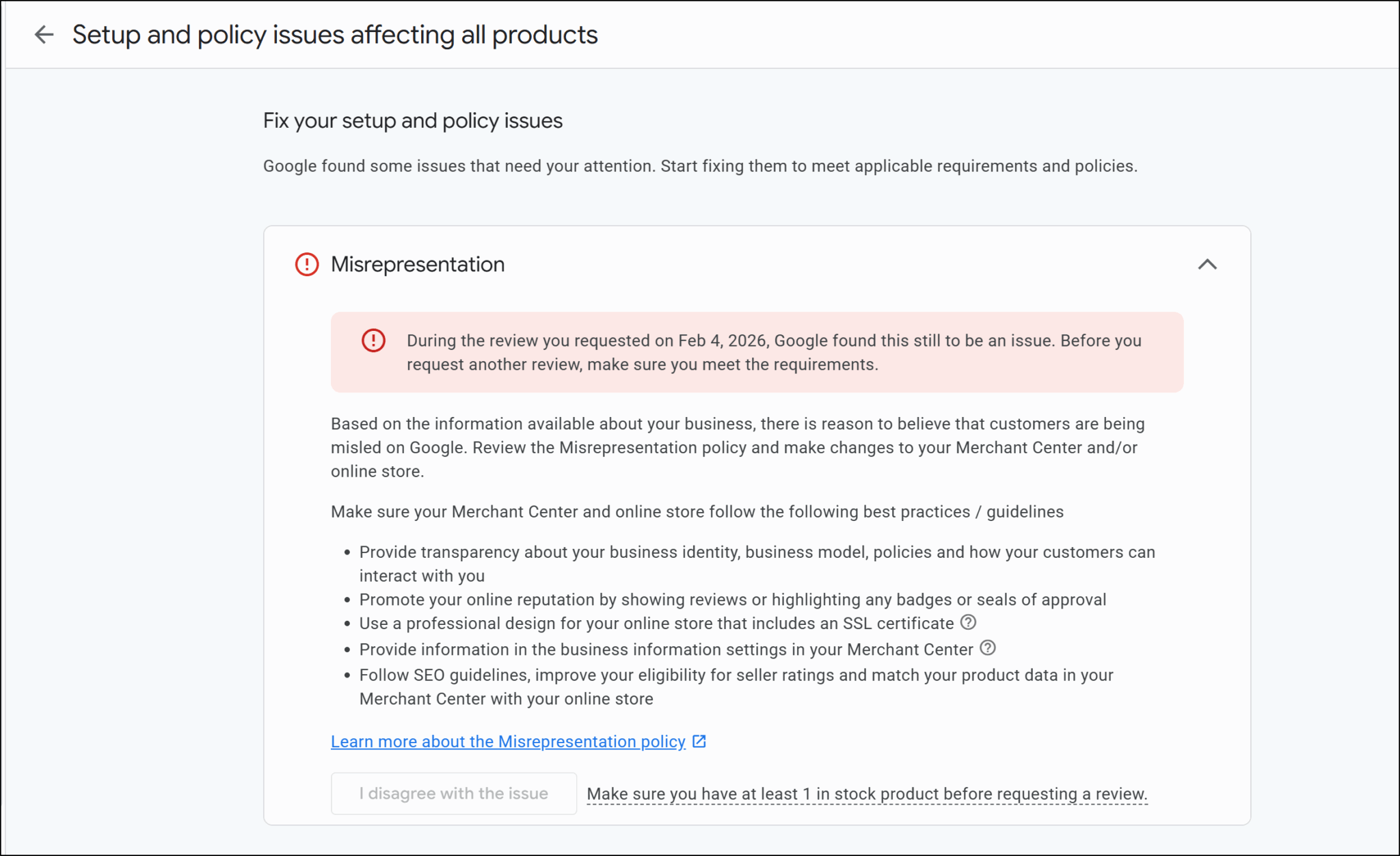
If that banner says misrepresentation, you're dealing with one of the most serious suspension types Google issues. It doesn't mean you're running a scam. It means something about your store, your policies, your product data, your website setup, gave Google enough reason to flag your account as a risk to shoppers.
The good news: it's fixable. Our team has reinstated over 300 suspended GMC accounts since 2015. This guide walks you through exactly what we check when we take on a misrepresentation case.
Before you do anything else, read the next two points carefully.
Two things to know before you touch anything
- Do not delete your suspended account. Google states explicitly that deleting your account does not fix the suspension. Your new account will be suspended for the same reason, and you'll lose your account history.
- Do not hit the review button without fixing the problem first. You have a limited number of review attempts. Use them on an unfixed account and you will run out. Once that happens, Google can permanently block your account.
Before we get into the full guide, grab our free checklist to follow along: [Free GMC Misrepresentation Suspension Fix Checklist 2026]
What Is a Google Merchant Center Misrepresentation Suspension?
A Google Merchant Center misrepresentation suspension means Google has determined that something about your store could mislead or deceive shoppers. Their goal is not to punish you; it's to protect buyers from anything that feels unclear, inconsistent, or untrustworthy.
Google checks three things when assessing misrepresentation risk:
- Your website and landing pages: do they look legitimate and consistent?
- Your product listings and feed: do they match what's on your site?
- Your business information and policies: are they complete, specific, and easy to find?
Here's the part most store owners miss: it's almost never one single thing that caused the suspension.
Google uses what we call a risk meter. Each problem in your account adds to your risk score. When that score gets high enough, Google suspends you. This is why your competitor might do the same thing and not get suspended; different accounts have different risk profiles, and everything adds up differently.
The fix isn't finding one thing. It's going through your entire setup systematically and cleaning it all up before you request a single review.
Stores That Cannot Be Reinstated
Before you do any of the work below, check this first.
Not every misrepresentation suspension can be fixed. If your store sells prohibited products: weapons, counterfeit goods, tobacco, dangerous supplements, no amount of changes to your website will get your account reinstated.
The same applies if your store makes unverifiable health or medical claims: “Cures cancer,” “Reverses diabetes,” “Lose 20 lbs in 1 week.” Google will keep you suspended unless you remove the claim entirely or provide strong, verifiable medical documentation to back it up.
Go through Google's Shopping Ads prohibited content list before you spend hours on the checklist below. This is the first thing our team checks when a new client comes to us.
If you'd rather have our team handle this, we've reinstated 300+ suspended GMC accounts since 2015. [Apply here]
The Complete Google Merchant Center Misrepresentation Fix Checklist
Follow every step before you request a review. Partial fixes usually don't work, Google looks at the whole picture, not individual items.
Download the free checklist and follow along as we go through each section: [Free GMC Misrepresentation Suspension Fix Checklist 2026]
1. Your GMC Account Settings
Start inside your Google Merchant Center account. Every piece of business information needs to be accurate and — critically — consistent across every place your business exists online: your GMC account, Google Ads, your Google Business Profile, and your social media.
- Physical address: real, correct, and matching across all platforms
- Phone number: a real number someone from Google could call
- Branded email address: hello@yourstore.com, not yourstore@gmail.com
- Custom domain: not a myshopify.com subdomain
- Website claimed and verified inside Merchant Center
- Shipping settings in GMC match your website's shipping page and your actual checkout process; all three must be consistent
2. Your Website
When we audit suspended accounts, there's almost always something on the website contributing to the suspension, not just inside GMC. Go through this carefully.
- Run Google PageSpeed Insights on your homepage, product pages, and checkout
- Fix broken links, spelling or grammar errors, and any placeholder text. If “Lorem ipsum” is anywhere on your site, remove it
- Use custom product imagery; stores that look identical to dozens of others using the same supplier images are a risk factor
- Get reviews on your store; they signal to Google that real people have bought from you
- Audit every installed app and plugin; remove what you don't need, and check reviews on what you keep. Upsell apps that cause checkout issues have triggered suspensions before
3. Trust and Transparency Pages
Your contact page is one of the strongest trust signals for Google, and most stores don't include enough on it.
- Contact page: branded email, phone number, physical address, contact form, business hours, and estimated response time
- SSL certificate: installed and working, not just on your homepage, through to the final checkout confirmation page
- About Us page: share your mission, your background, and photos of your team if possible, real people behind a real store is a trust signal Google recognises
- Terms and Conditions page: unique to your store, not copied from another site with their brand name still in it
- Privacy Policy: explains clearly how users' browsing data may be used, link it in your footer and make it visible during checkout
4. Your Store Policies
Vague policies are a trust problem. Google wants to know exactly what a customer can do if something goes wrong.
Returns and refund policy — cover every scenario:
- Change of mind, faulty item, damaged product, wrong item, item never arrived, cancellation after ordering
- For each scenario: spell out the process, the timeframe to make a return, and how long until the refund arrives
- Policy language must match the language of your target market
Shipping policy — must match your GMC shipping settings and your actual process:
- Cost per shipping location, delivery timeframe, courier used, how customers track their order
- Include a section for what happens if part of an order is missing
- Link all policies in your footer and on product pages — they must also be visible throughout checkout
5. Your Product Pages
- No false or misleading claims; no bold health claims, no fake certifications, no trust badges without a real affiliation behind them
- Remove fake urgency; countdown timers that reset or “only a few left” messages that aren't true are a fast path to suspension
- Product feed in Merchant Center must match your product pages exactly, titles, prices, images, and availability
- Price at checkout must match the price in your feed; any discrepancy is a flag
- If you're dropshipping, be upfront about it; let customers know delivery times and who is fulfilling the orders
- Branding consistent everywhere; store name, logo, and email must match across your site and your GMC account
6. Your Checkout Process
The checkout is one of the most overlooked areas we find when auditing suspended accounts. Go through it yourself as if you're a customer.
- Policy links: returns, shipping, privacy policy, terms and conditions, visible throughout the entire checkout process, not just in your footer
- Contact information visible during checkout: physical address, email, and phone number (you need at least two)
- Multiple payment methods displayed in your footer before customers even reach checkout
- Shipping costs at checkout must match your shipping page and your GMC shipping settings exactly
- Test any active promotions; we have seen stores get flagged because a promotion was live in Merchant Center but broken on the site
Final Checks Before You Request a Review
- Product feed submitted with at least one active product: Google requires this before the appeal button becomes available
- Do not delete your feed while suspended; the appeal button disappears without it
- Check for a second suspended GMC account linked to your account. Resolve the original account first before addressing any linked accounts
- You can only have one Google Merchant Center account and one Google Ads account
- Do not create a new GMC account while suspended. Google treats this as an attempt to bypass a policy violation, that new account will be suspended immediately.
How to Request Your Review the Right Way
This is where most store owners get it wrong, even after doing all the work above. You have two options and they are not equal.
Option 1 — Automated review (not recommended):
Click the Fix button in the red banner and click “I disagree with this issue.” No human looks at it. You don't get to explain what you fixed or share any proof. If it rejects you, you're on a cooldown of at least 7 days before you can try again, and you've burned one of your limited attempts.
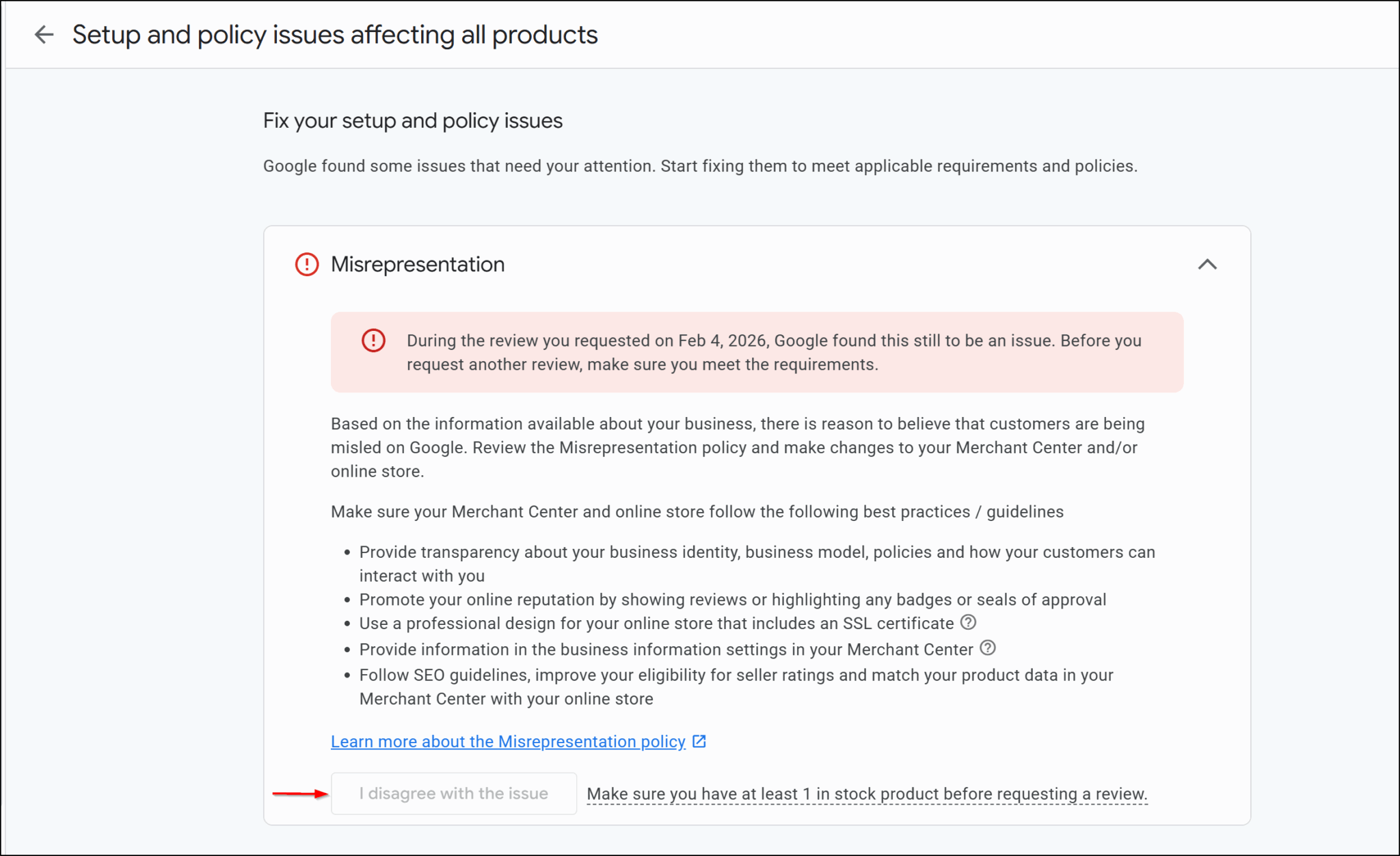
Option 2 — Manual escalation (what our team uses every time):
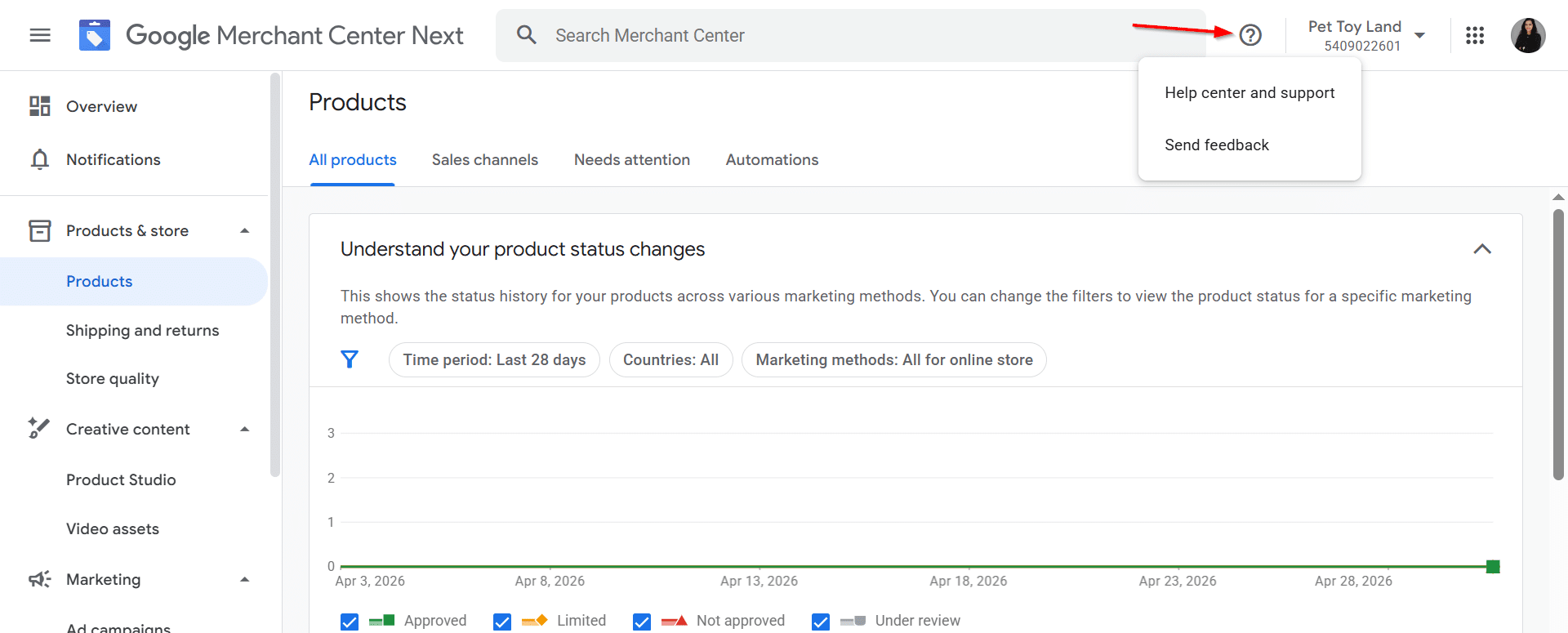
1- Click the question mark icon in your Merchant Center account
2- Select Contact Us and reach Google support directly through chat (use email if chat isn't available)
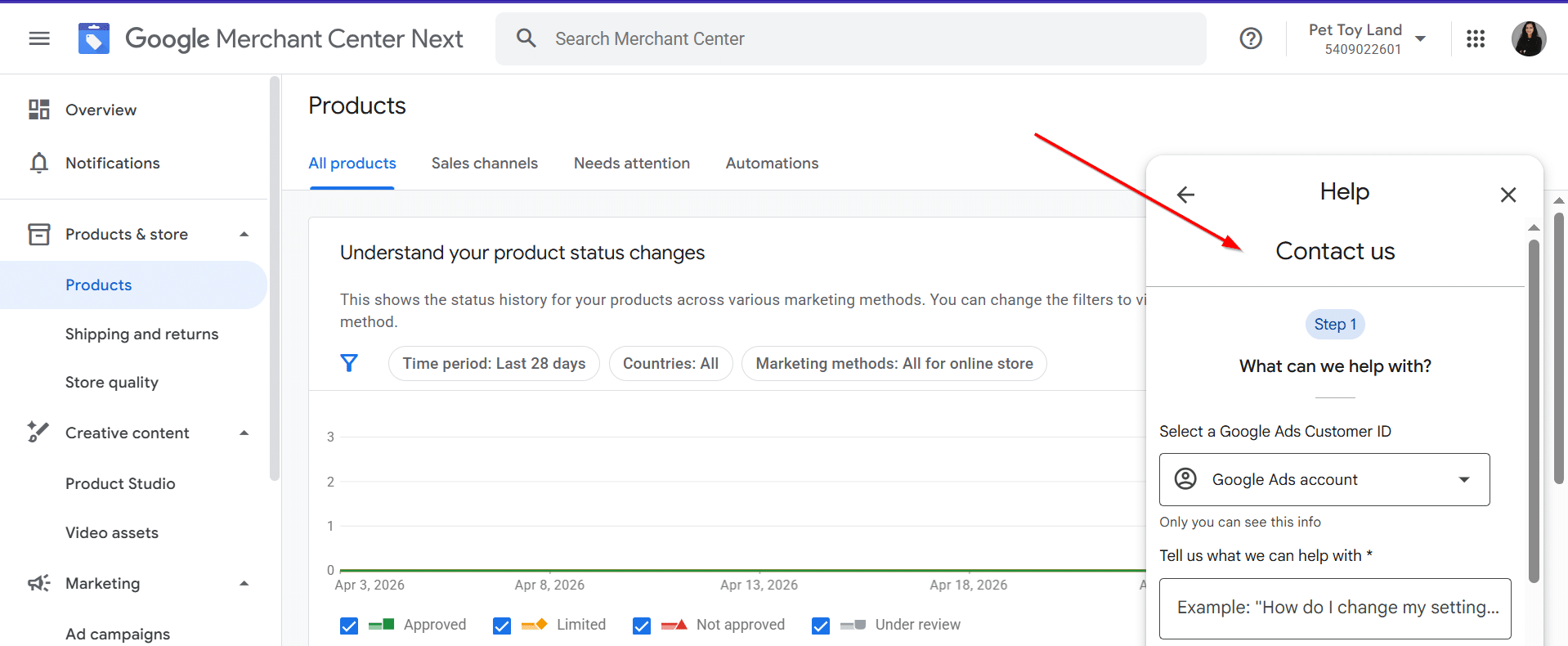
3- Tell them specifically what you fixed; list every item
4- Share proof of your legitimate business: official documents, contracts, partnership agreements
5- Ask them to escalate your case to the wider team for a manual review
The key advantage: if a manual review gets rejected, there is no cooldown period. Unlike the automated option, you're not losing time on top of losing an attempt.
How to Keep Your Account Safe After Reinstatement
- Audit your site monthly: go through the checklist, fix anything that has slipped
- Watch out for apps and plugins: fake urgency timers, fake review apps, and trust badges with nothing behind them will get you back into trouble
- Monitor Google's policy updates and fix any changes quickly
- Use Google Search Console to monitor your site's health regularly
- Check the Needs Attention tab in your Merchant Center account often, don't wait for a suspension to find something is wrong
Still Stuck After Multiple Rejections?
Misrepresentation is the hardest suspension type to reverse. If you have done everything right and still got rejected, don't give up. Keep going through Google's policies, keep auditing your store, and keep finding and fixing things. Most of the time it is fixable.
If you'd rather have someone handle the entire process, our team has been doing this since 2015 and has reinstated over 300 suspended GMC accounts. We handle the full audit, the fixes, and the appeal. If we don't get your account back within 30 days, you pay nothing.
Suspended for Misrepresentation? We can fix it.
Our team has reinstated 300+ suspended GMC accounts since 2015.
Apply here — if we don't get your account back in 30 days, you pay nothing